"Character Rounding" for Double-Sized characters on bitmapped displays such as SSD1306

AllyCat

Senior Member
Hi,

PICaxe is not well-suited to displaying characters on bitmapped displays because it is relatively slow and has limited memory storage for the character fonts. However, the tiny OLED displays which use the SSD1306 have an appeal because they are small and can run on 3.3. volts with low power. The display is organised in rows of pixels one byte (8 bits) high, so it is most convenient to use a font 8 bits high by 5 bits (plus a space bit) wide. These characters are rather small so an obvious solution is to double their height and/or width by duplicating pixels vertically and/or horizontally, thus avoiding the need for a larger memory.

Doubling the width is very easy, by just transmitting each byte to the display twice, but double-height is more difficult because the bytes must be increased to words with the bits interleaved within themselves. Numerous methods, some quite sophisticated, have been discussed but, at least for a PICaxe, a simple lookup table method appears to be the most efficient, as shown in post #139 of this long thread. For quadruple-height characters, the "mathematical" method needs 32-bit words and the simple "bit-swapping" would take twice as long, so it seems the benefits of the lookup method actually increase.

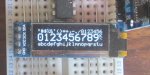
Some of the doubled characters can look rather "blocky", but there is another defect when using diagonal lines that are (effectively) only one pixel wide. Consider a square of 100 unit-sized pixels : A horizontal or vertical line contains 10 pixels and is 10 units long, whilst a diagonal also contains 10 pixels but is almost 15 units long (i.e. multiplied by the squatre root of 2), so it looks less bright (photos below). Horizontal and vertical lines 2 pixels wide would contain 20 pixels, but if the width of diagonals can be increased to 3 pixels (horizontally and/or vertically), they can contain 30 pixels, giving a more uniform brightness (along their greater length). Furthermore, if the "edge" pixels of the diagonal line are suitably staggered then the line has a smoother appearance. Such methods were developed for the Teletext (TV) character displays in the 1980s, but they used primarily a hardware method.

The principle of the Teletext "character rounding" (or diagonal smoothing) system can be explained by considering a square of 9 pixels (i.e. 3 x 3). The centre square should be set as a "1" if two opposite corners are set to "1" and the other two to "0". This occurs in two cases of the 16 possibilities (i.e. all permutations of the four corner pixels) which could be determined with a lookup table and also gives us a "clue" that the algorithm should implement a 1 in 8 selection. But collecting together the 4 pixel bits into a single nibble (to access the table) would be time-consuming and calculates only one pixel at a time. Ideally, we want to calculate a full byte (or even word) of individual bits in parallel,.

Testing for the equality of two diagonal corners seems the obvious method, but is not efficient; it needs an AND of the pixels (to detect two 1s), a NOR (for two 0s) and then an OR logic operation. This must be done for each diagonal and finally their inequality verified. Much better is to test for the the inequality of adjacent (horizontal or vertical) corner pixels, which can be done with a simple EXCLUSIVE-OR function. Furthermore, the two pairs of horizontally-separated pixels can be compared in a single XOR operation, then two vertical inequalities tested by simple shift and XOR operations, and finally an AND. Shifting (in an M2) can use division or multiplication, but multiplication (or adding to itself, if a single bit-shift is required) is slightly faster.

The algorithm coded below is for pixels (stored in Words) which have already been height-doubled. This implies that adjacent pairs of bits are identical, which may be less efficient, but it is easier to visualise the half- (source) pixel offset implicit in the rounding or smoothing technique. Note that pixels are also added to the source words, not just to the newly-calculated intermediate words. Ultimately it may be worthwhile to adapt the algorithm to use individual (not paired) bits within the words, i.e. before the vertical stretching process. This could be particularly beneficial for quadruple-height characters, but also gives the possibility of processing two pairs of source columns within a single word. In principle, this requires only two passes per character, because the outer verticals do not have pixels added. so only 4 internal bytes (for double-height) need to be calculated before stretching.

The program takes character bytes indirectly from the "high" area of RAM, restores the processed bytes to an adjacent area and shows the resulting character via SERTXD commands. It avoids the use of @BPTR {INC} because this may be dedicated to the interrupt routine for a character-receiving buffer. Note that some care is needed in the design of the font: The algorithm (and similar ones) has a "flaw" that a hollow diamond (i.e. lit pixels to the N, S, E and W of an unlit pixel) becomes filled at its centre.
Code:
; Character Rounding algorithm for double-height/width column-scanned 5x7 characters (12 x 16 cell)
; This version assumes height is already doubled (i.e. word data). AllyCat March 2020.
#picaxe 08M2
#no_data

symbol CHARST = 100                                ; First (blank) column of character
symbol CHAREND = 110                                ; Last (blank) column of character
    call loadpix                                        ; Load the source character pixels into upper (indirect) RAM
symbol source = b19                                ; Source pointer
symbol dest = b20                                    ; Destination pointer
    dest = 80                                        ; Set first Destination 

    for source = CHARST to CHAREND step 2    ; 6 columns of Word values
        peek source, b2,b3,b4,b5                 ; Get two adjacent input columns

        w0 = w1 xor w2                                ; W1 and W2 contain source pixels of adjacent columns
        w0 = w0 * 4 and w0                        ; Require both top and bottom corner squares to be different
        w0 = w2 * 4 xor w2 and w0 / 2         ; Require also upper and lower RHS corner pixels to be different
        w2 = w2 or w0                                ; Add extra pixel(s) to RH column
        w0 = w1 or w0                                ; Add extra pixel(s) to intermediate column (algorithm = 25 bytes)

        poke dest, b0,b1,b4,b5                    ; Write the middle and RHS columns to memory
        dest = dest + 4                            ; Advance pointer
        call show                                    ; Intermediate column in W0
        w0 = w2                                        ; Copy RHS column
        call show
    next                                                ; Next pair of columns
end

show:
    sertxd(cr)
    call show2            ; High byte
    b1 = b0                ; Load low bye and fall into show2
show2:
    sertxd(#bit15,#bit14,#bit13,#bit12,#bit11,#bit10,#bit9,#bit8)
return

loadpix:
w0 = 0                                 : poke 100 , word w0    ; Poke of a WORD constant is a syntax error
w0 = %11111111111111     : poke 102 , word w0
w0 = %00000011000000     : poke 104 , word w0             ; "K"
w0 = %00001100110000     : poke 106 , word w0
w0 = %00110000001100     : poke 108 , word w0
w0 = %11000000000011     : poke 110 , word w0
w0 = 0                                  : poke 112 , word w0
return


TeletextBBC.pngTeletextBBCcr.png

Cheers, Alan.
 
Hi,

I have now adapted the above program to drive a "real" SSD1306 OLED display, so an update to the ideas and decisions outlined above is appropriate.

The original program put "zero" (background) columns each side of the 5 source columns of data and then performed 6 iterations in a loop, which gave a "neat" structure. However, the zeros in the outer columns do not actually create any "new" data, and in practice only four iterations are required to create the new (interpolated) inner columns; thus the routine is a little inefficient. Also, it may be more convenient to tightly pack the character data within the memory, with no inter-character spaces (0). Therefore, the new version uses only 4 iterations, with small sections of "top and tail" program code (before and after the loop) to handle the outer columns (unchanged).

The PICaxe "Arithmetic Logic Unit" internal operations are just as efficient when using words (of 16 bits) as bytes. But memory operations are very much byte-oriented, so it is more efficient to import each data column as a single byte and then "stretch" it to a (Double-Height) word within the Rounding algorithm. However, the "vertical stretching" process is also time-consuming, so it is better to perform this before the data is expanded sideways from 5 columns up to 10. Although it appears twice in the listing (in the header and in the loop), a separate subroutine is NOT used, because it would save few, if any, program bytes and add significant timing delays.

Avoiding the use of the @BPTR variable, above, was an unrealistic constraint, because it is a very powerful tool for efficiently handling strings of pixels / bytes. Also, a number of different "character-pixel-handling" (sub)routines might be needed and the BPTR is a very convenient way to pass strings of data into or out of generalised routine(s). And "overlaying" the output bytes directly onto the input bytes (i.e. a Read - Modify - Write process) reduces the number of "pointers" that need to be incremented. However, in this particular application, it cannot be used because the new data bytes need to be interleaved between the original data bytes.

Code:
;  Character Rounding (Diagonal Interpolation) routine for 5 x 8 characters
;  AllyCat, June 2020.
#picaxe 08m2        ; And most others
data 0,(0,3,12,15,48,51,60,63,$C0,$C3,$CC,$CF,$F0,$F3,$FC,$FF)        ; For vertical stretching
symbol index = b0
symbol tempb = b1
symbol tempw = w1              ; Interpolated column
symbol lobyte = b2                ; Of tempw
symbol hibyte = b3
symbol wx = w2                    ; LH column
symbol wxlo = b4
symbol wxhi = b5
symbol wy = w3                    ; RH column
symbol wylo = b6
symbol wyhi = b7
symbol source = b8
symbol dest = b9
symbol col = b10
symbol row = b11
symbol addr = w6                             ; Word required for external serial EEPROM address
symbol OLEDSAD = $78                        ; OLED Slave address

CharacterRounding:
    bptr = 100                                       ; Start of upper row
    source = 105                                    ; to 109 (inclusive)
    dest = 110                                        ; Start of 10 bytes in lower row
    peek source,wxlo                               ; Start "fetch" routine
    wxhi = wxlo / 16                                ; Get the first column byte and expand to a word (in wx)
    wxlo = wxlo AND 15
    read wxhi,wxhi                                   ; Stretch        
    read wxlo,wxlo 
    @bptrinc = wxlo                                ; Upper row, first column (no rounding applicable)
    poke dest,wxhi                                   ; Lower row, first column
    inc dest  
    do                                                    ;  Executed 4 times
        inc source  
        peek source,wylo                            ; RH column
        wyhi = wylo / 16
        wylo = wylo AND 15
        read wylo,wylo
        read wyhi,wyhi 
        tempw = wx xor wy                                 ; Compare pixels of adjacent columns
        tempw = tempw * 4 and tempw           ; Require both top and bottom corner pixels to differ
        tempw = wx * 4 xor wx and tempw / 2     ; Require also upper and lower corner pixels to differ
        wx = wx or tempw                                   ; Add the extra pixels (in tempw) to left column
        poke dest,wxhi                                ; Lower row pixels
        inc dest
        @bptrinc = wxlo                            ; Upper row pixels
        tempw = tempw or wy                        ; Add right-hand column to extra pixels to create new column
        poke dest,hibyte
        inc dest 
        @bptrinc = lobyte 
        wx = wy                                         ; Copy RH column to LH column
    loop until source = 109                        ; Source pointer not post-incremented    
    @bptr = wxlo                                     ; Store the final column (unchanged)
    poke dest,wxhi
If one looks carefully, there are a few "imperfect" pixels, for example one pixel "missing" at the top of the "1" and "4", which I thought might be a bug in my algorithm. But they are also (not) there in the published font ("Bedstead") - it's known that the algorithm has a few flaws, such as filling-in the "small diamond" mentioned previously. I guess they're just more noticeable in the 20 characters on the little OLED, compared with the 960 characters of a standard Teletext TV screen. It's also worth remembering that the original font uses only 5 bytes per character and the Rounding routine adds the equivalent of less than one extra byte per character to the Program / EEPROM size.

CharacterRoundedDigits.JPG

Therefore, I devised a simple patch routine which might be useful if programming a larger EEPROM, or for a few High Quality characters. Normally, the patch might be configured as an overlay, but here it's arranged so that it can be applied "on the fly" (i.e. for any current character), which for example might be used for just Quad-Height digits on the OLED. The routine simply checks for one column (byte) number of the selected character and toggles the indicated pixel(s). For simplicity, the unspecified / zero entries implement a "No OPeration". This structure can be used to modify only one column per character, but could be duplicated for the few characters that might require further modification(s). So here is the patch, followed by typical code to send the completed data to an SSD1306 display.
Code:
; PATCH THE ROUNDED FONT :
    tempb = 0
    lookdown index,(0,"1","3","4"),tempb    ; Character number (ASCII)
    lookup tempb,(0,103,108,105),bptr        ; Column address (in RAM) upper or lower row 
    lookup tempb,(0,2,4,2),tempb                ; XOR pixels
    @bptr = @bptr xor tempb                     ; Toggle the pixels
; NOW DISPLAY THE CHARACTER ON OLED :
        hi2csetup i2cmaster,OLEDSAD,I2CSPEED,i2cbyte            ; For SSD1306 OLED display
        tempb = col + 11 : dest = row + 1
        hi2cout $0,($21,col,tempb, $22,row,dest)                          ; Set the character cell (12 x 16)
        col = col + 12 and 127                                                       ; Prepare for Next character
        bptr = 100  : addr = $40
        call sendrow12                                      ; Upper row then fall through for Lower row
sendrow12:
        hi2cout addr,(@bptrinc,@bptrinc,@bptrinc,@bptrinc,@bptrinc,_
            @bptrinc,@bptrinc,@bptrinc,@bptrinc,@bptrinc,0,0)  
return

Cheers, Alan.
 
Hi,

Here is an update to this thread, because I have been recently looking at the possibilities of side-scrolling characters with a variable-width font. These two features combine together quite well because scrolling displays might have a very limited number of pixels, so narrower characters may be preferred, and Tabulated Columns are unlikely to be of interest. But generally, a variable-width may not save much PICaxe Memory (although the storage method shown here saves some) because normally an additional lookup table for the width of the characters, or more likely for each characters' start address, is needed.

The Algorithm here operates on a pixel-column by pixel-column basis, rather than character-by-character as was shown in post #2. Thus it needs only 4 RAM bytes for its output data (currently located immediately above b27). It can use any character-width, because the algorithm is "Reset" by the intercharacter Gap of "unlit" pixels. However, when attempting to adapt either of the programs above, I encountered some "issues" with the output from the Algorithm. Both programs and my description, appear to be all "correct", but the little algorithm behaves in quite a complex manner. As stated above, it receives (typically) 5 columns of pixels and creates 4 new columns in-between, but the actual output is of 10 columns wide, which should be "symmetrical" for characters such as A , H , I , M , O , T , V , W , X and Y , etc.. Hence my comment above (in the penultimate paragraph of #1) that the algorithm also modifies the input/source columns of pixels. This was the cause of my issues; that for a subsequent iteration, the algorithm must (re-)use the original source columns and not the modified columns that have been sent for display.

The following demonstration program should run on any (current) PICaxe, or the Simulator (very slowly), with various Conditional Options (#IFDEFs) selected. It shows the pixel-maps of the included characters, in a "Double Sized" format, either without or with Character Rounding (#Define Roundit) and Markers for the Pixel Row and Column numbers. The latter are used for an optional Patch of the few known "missing" pixels in the Rounded digits 1 , 3 and 4 , described and shown above (final paragraphs in #2). The "Quad Height" option is only applied in the Printing Output routine (not the memory mapping) but shows the Font in a more realistic Aspect Ratio. However, it could be easily applied in a similar manner to the Double-Height introduced in the Rounding algorithm, extending the output buffer to 8 bytes. The Patching routine uses the LOOKDOWN command which needs only a single byte entry for each of the few characters that are to be "fixed". Then a corresponding LOOKUP byte contains the column and row numbers of the pixel in single nibbles (i.e. up to 16), but both need to be processed only once for each character displayed.

The Pixels Data for this program are stored in a rather unusual way. The 256 bytes of EEPROM in all PICaxes is insufficient to store a full ASCII characters set (96 bytes) and the 08M2 does not have any TABLE memory. Embedding the data within I2COUT commands is a fast and effective method that I have described HERE, but the program itself cannot directly read the Pixels, as required for this Program. It is possible to send the data out to an external I2C Bus RAM and then Read it back again at an acceptable speed, but the RAM hardware may not be available in a simple application. The POKE instruction is far too inefficient in both size and speed, but the LOOKUP instruction is quite similar to the HI2COUT and of course makes the data available directly to the program. However, only one byte at a time can be Read (specified within the command itself), unlike the I2C which can transfer bursts of bytes of almost any length. Hence the application here, where the columns of pixels (i.e. one byte) are generally required only one at a time, e.g. before each "soft" (pixel-width) scroll.

The demonstration program includes just ten sample characters, the digits 0 to 9, mainly in a 4 pixel wide source format. The "1" requires only 3 pixels but the "zero" uses the classical Teletext Diamond-Style zero, which needs 5 pixels (or a higher Odd number) width, as do many of the "symmetrical" characters. Most of these characters have been adapted from an "off the shelf" font and I may do much the same for the remainder of the character set, in due course.

Code:
#picaxe 08m2   ; And most others
;  Character Rounding (Diagonal Interpolation) routine for a variable-width Font
;  AllyCat, June 2020.  Updated September 2025.
#DEFINE ROUNDIT
#DEFINE QUADHEIGHT
#DEFINE PATCH    ;    Add/subtract single pixel per character
; #DEFINE MARKERS      ; Pixel Column and Row numbers (10 x 16) Not Quadheight

data 0,(0,3,12,15,48,51,60,63,$C0,$C3,$CC,$CF,$F0,$F3,$FC,$FF) ; For vertical stretching
symbol tempB = b1
symbol tempW = w1       ; Interpolated column
symbol Lobyte = b2      ; Or tempw
symbol Hibyte = b3
symbol wX = w2          ; LH column
symbol wXlo = b4
symbol wXhi = b5
symbol wY = w3          ; RH column
symbol wYlo = b6
symbol wYhi = b7
symbol Source = b8      ; Pointer to (Rounding) input byte in RAM
symbol patchbyte = b9   ; Zero unless Rounded character needs to be patched
symbol pix  = b10       ; Pixels byte from tree routine
symbol pcol = b11       ; Column byte to tree routine
symbol chr  = b12       ; Character byte to tree routine
symbol rank = b13      ;)
symbol sub  = b14       ;} branches within tree routine
symbol NOPIX = 13       ; Pixel Pattern (byte) which never occurs (indicates data not available)
symbol DEST = 28        ; Pointer to pixels buffer start (for Rounding)

demo:
 chr = 48      ; First character to display
 wX = 0
nextchar:
#IFDEF MARKERS
    sertxd(cr,"FEDCBA98765432")
#ENDIF
    pcol = 0           ; For Next character
 
#IFDEF PATCH
Patchfont:        ; Outside the column loop to save time
    patchbyte = 0
    lookdown chr,(0,"134"),patchbyte     ; Character symbol to be rounded. 0 If none required
    lookup patchbyte,(0,$21,$72,$41),patchbyte  ; pcol(3+1):pline(1+3) "1"s load into bptr
#ENDIF
nextcol:
    call tree       ; Get a column of pixels
    bptr = DEST        ; Pixels Output Buffer
    if pix = NOPIX then gap   ; No pixels returned
    @bptr = pix
    source = bptr
    call Rounding
    call showCR:
    inc pcol
    goto nextcol
gap:
    wY = 0
    call Round0
    call showCR            ; Multiple times for wider gap
    chr = chr + 1
    goto nextchar

showCR:                    ; Show 4 bytes Character Rounded
    bptr = DEST
    call showDH            ; Then fall through for second column
showDH:
 #IFDEF MARKERS
 tempb = bptr / 30 + pcol + pcol - 1 max 10   ; Column marker number
    sertxd(#tempb)
 #ENDIF
    sertxd(cr)
    gosub show8            ; Then fall into show8 for second byte
show8:
      b3 = @bptrinc        ; 8 Pixels vertically (LSb at top)
showpix:
      b2 = 0               ; Loop counter
show:
    if bit31 = 1 then
       sertxd("@")
#IFDEF QUADHEIGHT          ; Only in Demo printing routine, not screen pixel map
       sertxd("#")
#ENDIF
    else
    sertxd(".")
#IFDEF QUADHEIGHT
    sertxd(".")
#ENDIF
    endif
    w1 = w1 + w1 + 1       ; Shift left and set endflag
    on bit23 goto show     ; Loop until 8 bits
    Return

Rounding:
        peek source,wYlo                     ; RH column
        wyhi = wYlo / 16
        wylo = wYlo AND 15
        read wYlo,wYlo
        read wYhi,wYhi
Round0:
#IFDEF ROUNDIT
        tempw = wX XOR wY                    ; Compare pixels of adjacent columns
        tempw = tempw * 4 and tempw          ; Require both top and bottom corner pixels to differ
        tempw = wY * 4 XOR wY and tempw / 2  ; Require also upper and lower corner pixels to differ
        wX = wX or tempw                     ; Add the extra pixels (in tempw) to Left column
        tempw = tempw OR wY                  ; Add extra pixels to Middle column
#ELSE
        tempw = wX
#ENDIF
        @bptrinc = wXhi                         ; bptr is faster than a one-line POKE
        @bptrinc = wXlo
        @bptrinc = Hibyte
        @bptrinc = Lobyte
        bptr = bptr - 4                         ; Same size as a one-line fixed POKE
;        poke DEST,wXHi,wXLo,Hibyte,Lobyte      ; A variable pointer adds 12 bytes and is even slower (but avoids using BPTR)
#IFDEF PATCH
   if patchbyte = 0 then skippatch
      bptr = patchbyte / 32                     ; Column pair number
      if pcol <> bptr then skippatch
      bptr = patchbyte / 8 AND 3 XOR 1 + DEST   ; XOR flips hi/lo bytes (to msb first) ; Bits 4-3
      tempb = patchbyte AND 7
;      READ tempb,tempb                         ; Could replace Lookup instruction (add offset in the line above)
      lookup tempb,(1,2,4,8,16,32,64,128),tempb ; Uses about 12 bytes
      @bptr = @bptr XOR tempb                     ; Toggle the selected pixel
skippatch:
#ENDIF
      wX = wY
      bptr = DEST
     Return
tree:
  rank = chr / 16 - 2 : sub = chr AND 15   ; First 32 chars skipped
again:
  pix = NOPIX      ; Catch End Of Data or any missing characters
 ; Example Font for numbers 0-9
num:  on sub goto a48,a49,t50,a51,a52,a53,a54,a55, a56,a57 ; 0 - 9
a48: lookup pcol,($1C, $22, $41, $22, $1C ),pix : Return ; 0
a49: lookup pcol,($42, $7F, $40),pix      : Return ; 1
t50: lookup pcol,($62, $51, $49, $46),pix : Return ; 2
a51: lookup pcol,($21, $45, $4B, $31),pix : Return ; 3
a52: lookup pcol,($1C, $12, $7F, $10),pix : Return ; 4
a53: lookup pcol,($27, $45, $45, $39),pix : Return ; 5
a54: lookup pcol,($3E, $49, $49, $32),pix : Return ; 6
a55: lookup pcol,($03, $71, $09, $07),pix : Return ; 7
a56: lookup pcol,($36, $49, $49, $36),pix : Return ; 8
a57: lookup pcol,($26, $49, $49, $3E),pix : Return ; 9

Cheers, Alan.
 
Last edited:
Interesting stuff. I think it was back in the 1980s when I was working for Plessey Semiconductors that a fellow engineer and myself designed an essentially similar hardware character rounding system to display smoother looking teletext characters on a TV screen. We thought it was quite clever so applied for and got a patent (under Plessey's ownership) for which I was paid the princely sum of $1.
 
Hi,
We .. got a patent .. for which I was paid the princely sum of $1.

Ah yes, the other disappointment, when receiving the mandatory "Minimum of One Dollar" payment when assigning a patent for the USA, was that it was usually in the form of the (UK) Patent Attorney thrusting a grubby 50 pence coin into ones hand, for the signature (no Silver Dollar or Dollar Bill to frame). In those days fifty pence was actually worth more than a US Dollar. :(

The demonstration program includes just ten sample characters, the digits 0 to 9, mainly in a 4 pixel wide source format. ... I may do much the same for the remainder of the character set, in due course.

I did develop a full 4-pixel-wide font, but didn't post it before taking a holiday (and having a heart attack). However, I don't really consider that font very satisfactory, because many characters are symmetrical about a centre line, so an odd number of pixels seems more appropriate. Also, a significant number of the 4-pixel-wide characters actually have repeated (column) pixel bytes, so can retain their topology, or "identity", even if reduced to only 3 pixel/columns wide*. The 3-pixels-wide characters are interesting because when the character rounding/interpolation routine which started this thread, is applied, then the characters effectively return to 5 (or 6) pixels wide (up to 16 pixels high), but with a line/stroke width of 2 or 3 pixels. Recently I have been examining the fonts used in some scrolling displays, for example on pubic transport, which use lines or strokes that are two or even three pixels (LEDs) wide, sometimes presenting just a single vertical "line", for example the lower case "L" and "i".

* An interesting possibility with the repeated pixel bytes is to adopt a specific "repeat" symbol, which permits the display of either "normal" or "narrow" characters from the same data set (by either including or ignoring the repeated byte pattern). This can be implemented easily in various ways, using the #DEFINE feature of PICaxe Basic. The simplest method is to include or exclude the additional data bytes at the compilation stage, which also has the advantage of minimising the program size if only the narrowest font is required. Alternatively, a "marker" byte can be included, which allows the running program to itself select either narrow or wide characters at run-time. There are plenty of unused pixel patterns (bytes), particularly between 128 and 255, but values of less than 16 (often 11 and 13 are unused) save some program memory space, with the storage method employed in this, and related, threads.

Furthermore, PICaxe Basic has the useful facility that Constants and Variables can be freely mixed in some instructions, such as the LOOKUP construct employed here. Thus the "repeat" marker can be a simple variable name, which the running program keeps updated each time that a Pixel Pattern (byte) is read from the Data/Instruction set. Or if it is necessary for the running Program to identify the Repeated bytes, then the marker value can be written into the byte variable. In this case, it is not necessary to "predict" what the specific marker value can be, when the program is written; a running program can scan the complete data set (perhaps including any "user-defined" shapes) at start-up and then choose an unused value as the marker byte(s). I've written such a search routine, but there is insufficient space to include it here, within the forum's 10,000 characters limit.

Another use of #DEFINEd marker bytes is to optionally increase all of the character shapes to a standard width of e.g. 3 or 5 pixels, by adding blank pixel bytes (i.e. zero) onto one or both sides of the displayed pixels. However, for this case, a constant of zero is stored significantly more compactly than a full (8-bit) byte Constant, or a Variable address (register), so here it is better for the #DEFINE to include the Constant value explicitly, rather than in a Variable. Note that in these #DEFINEs, the position (and existence) of the commas is important, to avoid syntax errors in the compiled program.

Alternatively, instead of using #DEFINEs, the Data could be permanently edited using the Search / Find / Replace feature in any Text Editor, such as PE6. This can be done "Globally", but I prefer to do it step-by-step, to catch any unexpected or accidental changes (that can waste much more time than the Global Edit saves). Similarly, the whole LOOKUP subroutine structure (outside of the brackets) could be edited down to a normal DATA / TABLE format, to use with PICAXEs that have sufficient/suitable Data Memory (which the 08M2 lacks). But bear in mind that any variable-width font needs some method to identify (quickly) the address of the first pixel byte for each character.

For this character set I tried to ensure that every character differs from all others in at least two pixel-positions, but this may not be always possible, particularly with some of the punctuation/symbols (e.g. a single pixel for the dot/full-stop/decimal point). A square "Dot" of 4 pixels seems too large, so I have used two pixels vertically (since the characters have quite a "tall" aspect ratio anyway), but sometimes included is a "repeat" marker to widen the Dot if desired. Actually, the lower-case letters seemed easier to solve, for example by adopting curved "tails" (such as in the letter "t") in preference to "serifs" (as commonly used with the letter "i"). Personally, I dislike the "slash" (/) through the number zero, and of course this is impossible with a 3-pixel-wide character, so the Number and Letter "O" are differentiated by "Rounded" and "Square" shapes. However, we are now so familiar with the "square" (rectangular) zero from seven-segment displays, that I have used the "square" shape for the zero and the more rounded shape for the capital and lower-case letter "O" (but you may disagree).

Thus will follow an ASCII data set with entirely 3-pixel wide characters, that can be expanded to 5 (or 6) pixels wide, using the routine in post #3 above. There are a few characters such as "M" and "W" which really ought to be sourced as 5 pixels wide, but I have devised entirely 3-bit-wide patterns that are sufficiently "different" to all the others (of the 96 character ASCII set), and are perhaps acceptably "recognisable" after becoming familiar with them. A few characters such as the @ , & , Tilde (~) and Q , etc. needed some "creativity", but the capital N proved most elusive (due to its central asymmetry and similarity to the letter H); the best that I could devise is as a "Tall, lower-case N" (or to "patch" some pixels as below). Then, some "alternative" shapes (typically 4 or 5 pixels wide) are included as "extra" characters at the end, with a label prefix ("e" or "f", etc.) to allow the program to also display them (in ASCII addresses from 128 upwards), for the user to select as desired. Note that these "character data" subroutine rows do not need to be stored in any particular sequence, nor deleted if not used, but for future "program maintenance" it is recommended to do this before a program is finalised.

The program in post #3 includes an optional "Patch" routine to tidy up a few limitations of the "Rounding" algorithm, but is limited to one pixel-position for each character. This could be used also to improve some of the limitations of the 3-pixel wide font, but often more than one pixel needs to be changed, particularly for symmetrical characters such as M and W, etc., and the capital N. Therefore, I have modified the algorithm to permit multiple patches within a single character. The original program uses a single variable (patchbyte) which can remain at zero if no modification to the current character pixels are required, whilst the small number of changes can be accommodated within program LOOKDOWN/LOOKUP lists.

With the MULTIPATCH option, two pointer bytes are used, for the start and end (+1) addresses (in EEPROM or TABLE memory) of the group of patchbytes for any specific character. Thus the Patching code can be quickly skipped if/when the pointers are equal. Because this pixel data block usually may be larger than previously, the data is read from Data memory, to be faster and to avoid overloading the Program memory space. Note that each byte can patch only a single sub-pixel (i.e. after Character Rounding) which is 1/4 of a reference or input data pixel, so this method is suitable only for "tidying up" a few anomalies, not for improving the deficiencies of a complete character set.

In principle, the program in post #3 needs only the "tree" subroutine to be changed or expanded, but it is now very close to the forum's 10,000 character limit, so it must be held over until another post (currently the data is in the Sandbox if you're impatient). Similarly, just the basic changes to the main program are too large to include in the remaining space of this post, so I plan to add two more posts. The first can contain the main, updated program with the Multi-Patching feature, the Subroutine to check for unused pixel-pattern bytes, and the #DEFINEs. The second post should contain the latest Font Data, together with the associated pixel data to patch a few of the characters.

Thus it should be possible to add only the "tree" subroutine to the end of the main program and set a few of the Options (mainly #IFDEFs) as required. The program is primarily intended for the 08M2, but should run without any major changes on most of the other chips. It can be run in the Simulator, if you're patient, but it could take several hours to show the full Character Set with Character Rounding (which is what the font has been optimised for).

Cheers, Alan.
 
Hi,

So here is the main program, with some description in the previous post. The "tree" font data is in the Sandbox, but should be copied here below soon.
For a simple test/demo, Enable SHOWRAW and run in the simulator.
Code:
; Character Rounding (Diagonal Interpolation) demo for 1-5 x 8 characters (Proportional Font)
; AllyCat, June 2020. Updated April 2026 with Multipatch, and unused pixels-Byte Search options
#picaxe 08m2          ; And most others
#terminal 4800
' #no_data            ; Comment out until EPROM has been loaded !
#simspeed 29          ; Increase to enable tracking of instruction's execution
#DEFINE MULTIPATCH    ; Multiple pixels for selected characters  ~120 bytes
#DEFINE QUADHEIGHT    ; Linewrap (extra CR) if Quad and Markers in PE5
' #DEFINE SHOWRAW       ; Quick fix to show Raw (input source) characters (Not QUADHEIGHT)
#DEFINE MARKERS       ; Row and Column pixel numbers (12 x 16)   ~80 bytes
#DEFINE ROUNDIT       ; Use character rounding (diagonal interpolation) routine ~70 bytes
' #DEFINE CHECKNUL      ; Search for unused pixels pattern bytes   ~120 codebytes
' #DEFINE WIDERFONT     ; Insert the "repeat" and "pad" characters
#DEFINE ALTCHARS      ; Include the Alternative character patterns (as ASCII 128-160)
symbol STRBASE = 0    ; Lookup table for Vertical Stretching
symbol EXPBASE = 16 + STRBASE        ; Bit lookup for Patching Pixels
data STRBASE,(0,3,12,15,48,51,60,63,$C0,$C3,$CC,$CF,$F0,$F3,$FC,$FF) 
data EXPBASE,(1,2,4,8,16,32,64,128)  ; Subsequent data for Pixel-Patching located with the "tree" data

symbol tempB = b1
symbol tempW = w1        ; Interpolated column from Character Rounding algorithm
symbol Lobyte = b2       ; Or tempw
symbol Hibyte = b3
symbol wX = w2           ; LH column for Rounding Algorithm
symbol wXlo = b4
symbol wXhi = b5
symbol wY = w3           ; RH column
symbol wYlo = b6
symbol wYhi = b7
symbol patchbyte = b8  ; Zero unless Rounded Character needs to be patched (Repeat:Col(3):Line(4))
symbol patchptr = b9   ; Start (address) for the current character
symbol patchend = b10  ; End for the current character (b9=b10 if character not patched)
symbol pcol = b11      ; Column byte to tree routine
symbol chr  = b12      ; Character byte to tree routine
symbol rank = b13      ; Block of bytes within tree (typically 16 bytes)
symbol sub  = b14      ; Branches within tree routine
symbol REPT = b15      ; Repeat Pixels character
symbol pix  = w10      ; Pixels word from tree routine (Word required for nul-search)
symbol NOPIX = 511     ; Pixel Pattern (byte) which never occurs (marks character not available)
symbol DEST = 28       ; Pointer to pixels buffer start (for Rounding)

#IFDEF CHECKNUL        ; Test which pixel patterns are not used
 call findnuls
#ENDIF
#IFDEF SHOWRAW
  #UNDEFINE QUADHEIGHT
  #UNDEFINE ROUNDIT
  #UNDEFINE MULTIPATCH
#ENDIF

demo:
 chr = 78             ; First character to display
 wx = 0
nextchar:
#IFDEF MARKERS        ; Label the pixel numbers
#IFDEF QUADHEIGHT
    sertxd(cr," F E D C B A 9 8 7 6 5 4 3 2 1 0")
#ELSE   
    sertxd(cr,"FEDCBA9876543210")
#ENDIF
    sertxd(" chr=",#chr)
#ENDIF       
  pcol = 0           ; Next character

#IFDEF MULTIPATCH             ; Setup for (new) current character 
symbol PAT1 = EXPBASE + 8 : symbol PAT2 = PAT1 + 3  ; StartAddresses of groups
symbol PAT4 = PAT2 + 10 : symbol PAT6 = PAT4 + 4
Patchfont: 
    patchend = 0 : patchptr = 0
    lookdown chr,(0,"14","MmQWw","N","~"),patchend    ; List of Characters to patch. 0 = none
    if patchend = 0 then none
patchptr = PAT1        ; Start of lookup table ; Column numbers for each character must not decrease L to R
for tempb = 1 to 6     ; Number of Pixels to be changed in each group must not decrease L to R
;                 (  1 2 3 4 5 6) = Number of Pixels to be changed in each group
    lookup tempb,(0,2,5,0,1,0,1),patchbyte  ; Number of characters in each group (0...6) (uses 10 bytes)
    if patchend <= patchbyte then exit
    patchend = patchend - patchbyte
    patchptr = tempb * patchbyte + patchptr
next  
done:   
    patchptr = patchend - 1 * tempb + patchptr + 1   ; Pointer to (first) column to be patched
    patchend = patchptr + tempb                        ; Last patch address (+ 1) for current character
none:   
#ENDIF ; MULTIPATCH

nextcol:         ; Start processing a pixels column 
    call tree            ; Get the column of pixels (byte)
    bptr = DEST
    if pix = NOPIX then gap    ; No pixels returned
    @bptr = pix       ; Source address
    call Rounding    ; Algorithm
    call showCR:      ; Display result
newcol: 
#IFDEF MARKERS     ; Probably best location within loop is here:
tempb = bptr / 30 + pcol + pcol MAX 16   ; Column marker number
    sertxd(" ",#tempb)
#ENDIF
    inc pcol
    goto nextcol
gap:
    wY = 0
    call Round0
    call showCR            ; Multiple times for wider gap
    chr = chr + 1
    goto nextchar           
showCR:                     ; Show 4 bytes Character Rounded
    bptr = DEST
#IFDEF SHOWRAW
#ELSE    ; Normal path  (= IFNDEF)
    call showDH            ; Then fall through for second column
#ENDIF
showDH:  
    sertxd(cr)       
    gosub show8             ; Then fall into show8 for second byte
show8:
    b3 = @bptrinc        ; 8 Pixels vertically (LSb at top)
'    b0 = bptr             ; For debugging only
showpix:     
    b2 = 0                ; Loop counting
show:
    if bit31 = 1 then
#IFDEF QUADHEIGHT   ; Only in Demo printing routine, not screen pixel map
    sertxd("@#")         ; Fall into sent
#ELSE
    sertxd("@")      
#ENDIF
    else
#IFDEF QUADHEIGHT
    sertxd("..")
#ELSE
    sertxd(".")
#ENDIF      :
    endif
    w1 = w1 + w1 + 1       ; Shift left and set endflag
    on bit23 goto show     ; Loop until another 8 bits displayed
    Return

Rounding:   ; Subroutine
    peek bptr,wYlo                     ; RH column (bptr was "source" variable)       
    wyhi = wYlo / 16
    wylo = wYlo AND 15
    read wYlo,wYlo
    read wYhi,wYhi
Round0:       
#IFDEF ROUNDIT         
    tempw = wX XOR wY                      ; Compare pixels of adjacent columns
    tempw = tempw * 4 and tempw           ; Require both top and bottom corner pixels to differ
    tempw = wY * 4 XOR wY and tempw / 2   ; Require also upper and lower corner pixels to differ
    wX = wX or tempw                       ; Add the extra pixels (in tempw) to Left PRINTED column
    tempw = tempw OR wY                    ; Add extra pixels to Middle PRINTED column
#ELSE
    tempw = wY                              ; Skip interpolation algorithm. (was wX; seems a fix)
#ENDIF  ; /ROUNDIT
    @bptrinc = wXhi                        ; @bptr is faster than one-line poke of 4 bytes
    @bptrinc = wXlo
    @bptrinc = Hibyte
    @bptrinc = Lobyte 
    bptr = bptr - 4

#IFDEF MULTIPATCH      ; Process the current pixels column
    if patchptr = patchend then skippatch
patchloop:
    read patchptr,patchbyte
    bptr = patchbyte / 32                    ; Column-pair number (0-7),using bptr as temp variable
    if pcol <> bptr then skippatch           ; Still waiting for the correct column, or fall through
        bptr = patchbyte / 8 AND 3 XOR 1 + DEST ; XOR flips hi/lo bytes (why needed?) ; Bits 4-3
        tempb = patchbyte AND 7 + EXPBASE       ; Keep 3 low bits and Add table offset
        read tempb,tempb                          ; Uses 3 program bytes (and 8 Table/EPROM)
;        lookup tempb,(1,2,4,8,16,32,64,128),tempb  ; Uses 12 program bytes (maybe optimum with 08M2)
        @bptr = @bptr XOR tempb                  ; Toggle the selected pixel
        inc patchptr                              ; Next patch (in this or another character)
        if patchptr < patchend then patchloop     ; go back to try another (maybe in current column)
skippatch:  
#ENDIF   ; MULTIPATCH
        wX = wY
        bptr = DEST
        Return           ; End of Rounding (& display) routine

findnuls:
#IFDEF CHECKNUL
symbol BINSITUP = 32 - 1 ; Start address will be pre-incremented 
#IFDEF _08M2             ; Can't use a full page of RAM
    sertxd(cr,"08M2")
symbol BINSLEN = 16                   ; For <256, total Bins may be 2x larger
symbol BPTRM = BINSLEN + BINSITUP     ; Last RAM location to store separate data bytes
symbol BINSEND = BPTRM + BINSLEN      ; End of "overflow" bins
#ELSE
symbol BINSLEN = 256                  ; One bin for each pixel-byte value
symbol BINSEND = BINSITUP + BINSLEN  
#ENDIF
symbol  NUL = 511             ; =255 if a byte value used
for chr  = 32 to 160        ; Span of test ASCII character set
    pix = NUL                  ; Preload to detect NUL character/column
    for pcol = 0 to 4      ; Could be larger
        call tree                 ; Read a column of pixels (byte)
        if pix = NUL then exit    ; No (more) pixel data for the character
        if pix >= BINSLEN then    ; Store multiple pixels in "overflow" Bins
        pix = BINSLEN - 1 AND pix + BINSLEN
        endif
        bptr = pix + BINSITUP + 1 
      @bptr = @bptr + 1 MAX 255
    next pcol
    next chr
    bptr = BINSITUP
    sertxd(cr,lf,"UNUSED = ")
    do
        inc bptr
        if @bptr = 0 then
            tempw = bptr - BINSITUP - 1
            sertxd(#tempw,",")
        endif
    loop until bptr => BINSEND    ; 5 , 10 , 11 , 13 , 14
#ENDIF ; CHECKNUL
return

; Now the #DEFINES :
#IFDEF WIDERFONT
; NOTE: Comments cannot be on #DEFINE lines, so they are located on subsequent line  
#define rep , REPT
; Repeat previous pixel pattern (in REPT variable)  
#define ppad $00 ,
; Insert a 0 BEFORE character data
#define padp , $00
; Insert a 0 AFTER character data
#ELSE ; Minimum width font
#define rep
; No repetition
#define ppad
; No padding BEFORE character
#define padp
; No padding AFTER character
#ENDIF ; WIDERFONT
; Add the pixel-patching Data and "tree" subroutine here:
tree:

Cheers, Alan.
 
Hi,

Paste the following after the #DEFINEs above:
Code:
; lookdown chr,(0,"14","MmQWw","N","~")  ; 0,1,2,4,6 patched pixels/character
data PAT1,(0 ,$21 ,$41)                 ; "14"   ; All single patchbytes (L->R for each valid character)
data PAT2,($20,$50 ,$24,$54 ,$2C,$6B)   ; "MmQ"  ; 2 pixels per character  ; Optional 0(s) between groups
data      ($2D,$5D ,$2D,$5D)            ; "Ww"
data PAT4,($38,$39,$44,$45)             ; "N"    ; 4 pixels per character
data PAT6,($14,$16,$37,$44,$54,$56)     ; "~"    ; 6 pixels per char : Tilde from "T"

tree:
  REPT = pix              ; Store last value for any Repeat byte 
  rank = chr / 16 - 2     ; First 32 codes skipped, then blocks of 16 ASCII codes
  sub = chr AND 15        ; Position in Subgroup
again:
  pix = NOPIX      ; To trap any missing characters and columns of pixels 
   on rank goto SYM,NUM,CAP1,CAP2,LOW1,LOW2 ,EXT1,EXT2 ; Or Fall through if no data 
eac7: lookup pcol,($3E, $22, $3E),pix : Return             ; Box = Not Found   
SYM:  on sub goto a32,a33,a34,a35,a36,a37,a38,a39, t40,a41,a42,a43,a44,a45,a46,a47
a32: lookup pcol,(ppad $80 padp),pix : Return     ; half-width space (underlined)
a33: lookup pcol,(ppad $5F padp),pix : Return     ; !
a34: lookup pcol,($03, $00, $03),pix : Return     ; "
a35: lookup pcol,($3E, $14, $3E),pix : Return     ; # 
a36: lookup pcol,($2C, $7F, $1A),pix : Return     ; $
a37: lookup pcol,($33, $08, $66),pix : Return     ; %
a38: lookup pcol,($3E, $4D, $76),pix : Return     ; &
a39: lookup pcol,(ppad $03 padp),pix : Return     ; '
t40: lookup pcol,($1C, $22, $41),pix : Return     ; (
a41: lookup pcol,($41, $22, $1C),pix : Return     ; )
a42: lookup pcol,($2A, $1C, $2A),pix : Return     ; * 
a43: lookup pcol,($08, $3E, $08),pix : Return     ; +
a44: lookup pcol,($40, $30 padp),pix : Return     ; ,
a45: lookup pcol,($08, $08 rep, $08),pix : Return ; -
a46: lookup pcol,(ppad $30 rep padp),pix : Return ; .
a47: lookup pcol,($60, $18, $06),pix   : Return   ; /

NUM:  on sub goto a48,a49,t50,a51,a52,a53,a54,a55, a56,a57,a58,a59,t60,a61,a62,a63
a48: lookup pcol,($7F, $41 rep, $7F),pix : Return  ; 0 square
a49: lookup pcol,($42, $7F, $40),pix : Return      ; 1
t50: lookup pcol,($62, $51, $4E),pix : Return      ; 2
a51: lookup pcol,($22, $49, $36),pix : Return      ; 3
a52: lookup pcol,($1C, $12, $7F),pix : Return      ; 4
a53: lookup pcol,($27, $45, $39),pix : Return      ; 5
a54: lookup pcol,($3C, $4A, $31),pix : Return      ; 6
a55: lookup pcol,($71, $09, $07),pix : Return      ; 7
a56: lookup pcol,($36, $49, $36),pix : Return      ; 8
a57: lookup pcol,($46, $29, $1E),pix : Return      ; 9 
a58: lookup pcol,(ppad $36 rep padp),pix : Return  ; : 
a59: lookup pcol,($40, $36 rep padp),pix : Return  ; ;
t60: lookup pcol,($08, $14, $22),pix : Return      ; <
a61: lookup pcol,($14, $14 rep, $14),pix : Return  ; =
a62: lookup pcol,($22, $14, $08),pix : Return      ; >
a63: lookup pcol,($02, $59, $06),pix : Return      ; ?

CAP1: on sub goto a64,a65,a66,a67,a68,a69,t70,a71, a72,a73,a74,a75,a76,a77,a78,a79  
a64: lookup pcol,($3E, $45, $2E),pix : Return       ; @
a65: lookup pcol,($7E, $09 rep, $7E),pix : Return   ; A
a66: lookup pcol,($7F, $49 rep, $36),pix : Return   ; B
a67: lookup pcol,($3E, $41 rep, $22),pix : Return   ; C
a68: lookup pcol,($7F, $41 rep, $3E),pix : Return   ; D
a69: lookup pcol,($7F, $49 rep, $41),pix : Return   ; E
t70: lookup pcol,($7F, $09 rep, $01),pix : Return   ; F
a71: lookup pcol,($3E, $41 rep, $72),pix : Return   ; G
a72: lookup pcol,($7F, $08 rep, $7F),pix : Return   ; H
a73: lookup pcol,($41, $7F, $41),pix : Return       ; I
a74: lookup pcol,($21, $41, $3F),pix : Return       ; J 
a75: lookup pcol,($7F, $14, $63),pix : Return       ; K
a76: lookup pcol,($7F, $40 rep, $40),pix : Return   ; L
a77: lookup pcol,($7F, $02, $7F),pix : Return       ; M
a78: lookup pcol,($7F, $1C, $7F),pix : Return       ; N
a79: lookup pcol,($3E, $41 rep, $3E ),pix : Return  ; O

CAP2: on sub goto t80,a81,a82,a83,a84,a85,a86,a87, a88,a89,t90,a91,a92,a93,a94,a95
t80: lookup pcol,($7F, $09 rep, $06),pix : Return     ; P
a81: lookup pcol,($3E, $61, $7E),pix : Return         ; Q
a82: lookup pcol,($7F, $19, $66),pix : Return         ; R
a83: lookup pcol,($26, $49 rep, $32),pix : Return     ; S
a84: lookup pcol,($01 rep, $7F, $01 rep),pix : Return ; T
a85: lookup pcol,($3F, $40 rep, $3F),pix : Return     ; U
a86: lookup pcol,($1F, $60, $1F),pix : Return         ; V
a87: lookup pcol,($7F, $30, $7F),pix : Return         ; W
a88: lookup pcol,($63, $1C, $63),pix : Return         ; X
a89: lookup pcol,($07, $78, $07),pix : Return         ; Y
t90: lookup pcol,($71, $49, $47),pix : Return         ; Z
a91: lookup pcol,(ppad $7F, $41),pix  : Return        ; [
a92: lookup pcol,($06, $18, $60),pix : Return         ; \
a93: lookup pcol,($41, $7F padp),pix : Return         ; ]
a94: lookup pcol,($02, $01, $02),pix  : Return        ; ^ 
a95: lookup pcol,($40, $40 rep, $40),pix : Return     ; _

LOW1: on sub goto a96,a97,a98,a99,ta0,aa1,aa2,aa3, aa4,aa5,aa6,aa7,aa8,aa9,tb0,ab1
a96: lookup pcol,($01, $02 padp),pix : Return           ; ` 
a97: lookup pcol,($24, $54 rep, $78),pix : Return       ; a
a98: lookup pcol,($7F, $48 rep, $30),pix : Return       ; b
a99: lookup pcol,($38, $44 rep, $44),pix : Return       ; c
ta0: lookup pcol,($30, $48 rep, $7F),pix : Return       ; d
aa1: lookup pcol,($38, $54 rep, $58),pix : Return       ; e
aa2: lookup pcol,($08, $7E ,$09),pix : Return           ; f
aa3: lookup pcol,($98, $A4 rep, $78),pix : Return       ; g
aa4: lookup pcol,($7F, $08 rep, $70),pix : Return       ; h
aa5: lookup pcol,(ppad $3A, $40),pix : Return ; cursive ; i
aa6: lookup pcol,($40, $80, $7A),pix : Return           ; j
aa7: lookup pcol,($7F, $38, $44),pix : Return ;  narrow ; k
aa8: lookup pcol,(ppad $3F, $40),pix : Return ; cursive ; l
aa9: lookup pcol,($7C, $08, $7C),pix : Return           ; m
tb0: lookup pcol,($7C, $04, $78),pix : Return           ; n

LOW2: on sub goto ab2,ab3,ab4,ab5,ab6,ab7,ab8,ab9, tc0,ac1,ac2,ac3,ac4,ac5,ac6,ac7
ab1: lookup pcol,($38, $44 rep, $38),pix : Return         ; o
ab2: lookup pcol,($FC, $24 rep, $18),pix : Return         ; p
ab3: lookup pcol,($18, $24 rep, $FC),pix : Return         ; q
ab4: lookup pcol,($7C, $08, $04),pix : Return             ; r
ab5: lookup pcol,($48, $54 rep, $24),pix : Return         ; s
ab6: lookup pcol,($04, $3F, $44),pix : Return             ; t
ab7: lookup pcol,($3C, $40 rep, $7C),pix : Return         ; u
ab8: lookup pcol,($1C, $60, $1C),pix : Return             ; v
ab9: lookup pcol,($7C, $20, $7C),pix : Return ;    narrow ; w 
tc0: lookup pcol,($44, $38, $44),pix : Return ;   rounded ; x
ac1: lookup pcol,($9C, $A0, $7C),pix : Return             ; y
ac2: lookup pcol,($64, $54, $4C),pix : Return             ; z
ac3: lookup pcol,($04, $3E, $04),pix : Return ;   Obelisk ; Dagger
ac4: lookup pcol,(ppad $77 padp),pix  : Return ; Pipe/Bar ; |
ac5: lookup pcol,($22, $7F, $22),pix : Return ;    Diesis ; Double dagger
ac6: lookup pcol,($04, $0C, $04),pix : Return ;     Tilde ; T
ac7: lookup pcol,($80, $80, $80),pix : Return ;   3-width ; space (underlined)

#IFDEF ALTCHARS       ; remove e/f prefix to use in main routine 
EXT1: on sub goto ea35,ea36,ea37,ea38,ea42,ea46,ea58,ea59, fa59,ea64,fa64,ea71,ea75,ea77,ea78,fa78 
ea35: lookup pcol,($14, $3E, $14, $3E, $14),pix : Return       ; #    
ea36: lookup pcol,($24, $2A, $7F, $2A, $12),pix : Return       ; $   
ea37: lookup pcol,($63, $13, $08, $64, $63),pix : Return       ; %   
ea38: lookup pcol,($36, $49, $36, $50),pix : Return            ; &   
ea42: lookup pcol,($22, $14, $7F, $14, $22),pix : Return       ; *   
ea46: lookup pcol,(ppad $20 padp),pix : Return ;         small ; .    
' ea58: lookup pcol,(ppad $14 padp),pix  : Return ;      small ; :
fa59: lookup pcol,(ppad $20, $14),pix : Return ;         small ; ;
ea58: lookup pcol,(ppad $36, $36),pix : Return ;        large  ; : 
ea59: lookup pcol,(ppad $56, $36),pix : Return ;         large ; ;
ea64: lookup pcol,($2E, $65, $2E),pix : Return ;            AT ; @
fa64: lookup pcol,($1C, $22, $49, $55, $5E),pix : Return       ; @   
ea71: lookup pcol,($3E, $41, $51, $72),pix : Return            ; G
ea75: lookup pcol,($7F, $1C, $22, $41),pix : Return            ; K
ea77: lookup pcol,($7F, $02, $0C, $02, $7F),pix : Return       ; M 
ea78: lookup pcol,($7F, $02, $7C),pix : Return ;        tall n ; N
' fa78: lookup pcol,($7F, $06, $18, $7F),pix : Return ;        ; N
fa78: lookup pcol,($7F, $04, $08, $10, $7F),pix : Return       ; N

EXT2: 
on sub goto ea81,ea86,ea87,ea88,eaa5,eaa6,eaa7,eaa8, eaa9,etb0,eab8,eab9,etc0,eac3,eac5,eac6 
ea81: lookup pcol,($3E, $41, $61, $5E),pix : Return             ; Q
ea86: lookup pcol,($07, $18, $60, $18, $07),pix : Return        ; V
ea87: lookup pcol,($3F, $40, $38, $40, $3F),pix : Return        ; W
ea88: lookup pcol,($63, $14, $08, $14, $63),pix : Return        ; X   
eaa5: lookup pcol,(ppad $7A padp),pix : Return ;   narrow short ; i
eaa6: lookup pcol,($44, $7D, $40),pix : Return         ; serifs ; i
eaa7: lookup pcol,($7F, $10, $28, $44),pix : Return             ; k
eaa8: lookup pcol,(ppad $7F padp),pix : Return ;         narrow ; l   
eaa9: lookup pcol,($7C, $04, $78, $04, $78),pix : Return ; wide ; m
etb0: lookup pcol,($7C, $08, $04, $78),pix : Return             ; n   
eab8: lookup pcol,($1C, $20, $40, $20, $1C),pix : Return ; wide ; v
eab9: lookup pcol,($3C, $40, $30, $40, $3C),pix : Return ; wide ; w
; etc0: lookup pcol,($6C, $38, $6C),pix : Return ;  no rounding ; x
etc0: lookup pcol,($44, $28, $10, $28, $44),pix : Return ; wide ; x 
eac3: lookup pcol,($08, $36, $41),pix : Return                  ; {
eac5: lookup pcol,($41, $36, $08),pix : Return                  ; }
eac6: lookup pcol,($08, $04, $08, $04),pix : Return             ; ~
#ELSE     ; /ALTCHARS
EXT1:
EXT2:  
#ENDIF

Cheers, Alan.
 
Back
Top