Page 1 of 11 1 2 3 ... LastLast
Results 1 to 10 of 104

Thread: One-Wire Devices / Networks

  1. #1
    Moderator
    Join Date
    Mar 2008
    Location
    Western Australia
    Posts
    9,943

    Default One-Wire Devices / Networks

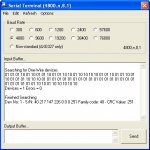
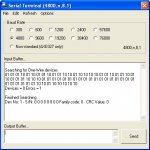
    Based upon the Maxim Application notes including, AN187, AN27 and AN4600,
    plus other info I am currently writing some PICAXE program code that will search a 1-wire network for connected devices.
    This code seems to be working based upon my use of zero and a single DS18B20 at this moment.

    There must be a pull up resistor on the PICAXE pin even with no devices present for correct operation.

    Also added mathematical program code to verify the CRC filed based on Maths as opposed to the more usual 256 byte look-up table which Maxim include in the App Notes which appears to be working based on comparison with a spreadsheet that Maxim make available via AN4600 by looking at the spreadsheet macro.

    Total program memory used so far is 575 bytes, and uses 20 byte variables (b1 as multiple 1-bit flags/values) for search and check but once done, all variables are then available for users ongoing program.


    Of some concern however is that rmeldo posted the 8 bytes ROM S/No data for two DS18B20 devices he has about a year ago and that fails my CRC checks and the Maxim spreadsheet for that matter.


    While I proceed with code development and fine tuning . . . .
    it would be good to see who else has some one-wire devices,
    particularly other than DS18B20's (I have a few more DS18B20's and about to try looking for multiple devices to prove that works properly)
    and if they can post with a link to their device datasheet AND post the actual ROM serial Nos so that I can enter into my code for further CRC code checking purposes to see if my math based CRC routine is "robust".
    Attached Images Attached Images
    Last edited by westaust55; 12-05-2010 at 11:40. Reason: added pics
    westaust55

    Hey Hamlet, 2B OR NOT 2B = $FF

  2. #2
    Senior Member
    Join Date
    Jan 2010
    Location
    Colorado USA
    Posts
    1,521

    Default

    I'm having a very groggy morning today. I opened the thumbnail - then tried to close it by clicking on it's "X" box. Duh. Caffeine......neeeed......

  3. #3
    Technical Support
    Join Date
    Jan 1970
    Location
    UK
    Posts
    18,392

    Default

    This is the code I have for one-wire checksum. Haven't checked it of late ( nor time to do so at the moment ), but it may help ...

    How do I check a One-Wire Device Checksum ?

    The following code will allow you to confirm that the checksum of a Dallas Semiconductor One-Wire device ( such as the DS18B20 temperature sensor ) is correct. Developed with thanks to Peter H Anderson.

    The checksum is an 8-bit CRC, using a polynomial of x8+x5+x4+x+1.

    Code:
            SYMBOL DS18B20    = PinNumber
    
            SYMBOL byte       = b0
            SYMBOL crc        = b1
            SYMBOL bit        = b2
            SYMBOL k          = b3
    
            SYMBOL POLYNOMIAL = $8C     ' x8+x5+x4+x+1
    
            READOWSN DS18B20            ' Fills b6 .. b13
    
            crc = 0
    
            byte = b6  : GOSUB CrcAdd
            byte = b7  : GOSUB CrcAdd
            byte = b8  : GOSUB CrcAdd
            byte = b9  : GOSUB CrcAdd
            byte = b10 : GOSUB CrcAdd
            byte = b11 : GOSUB CrcAdd
            byte = b12 : GOSUB CrcAdd
    
            IF crc <> b13 THEN ChecksumFailed
    
            END
    
        CrcAdd:
            FOR bit = 0 TO 7
              k = byte ^ crc & 1
              IF k = 0 THEN CrcAdd1
              k = POLYNOMIAL
            CrcAdd1:
              crc = crc / 2 ^ k
              byte = byte / 2
            NEXT
            RETURN

  4. #4
    Moderator
    Join Date
    Mar 2008
    Location
    Western Australia
    Posts
    9,943

    Default

    Quote Originally Posted by hippy View Post

    The checksum is an 8-bit CRC, using a polynomial of x8+x5+x4+x+1.
    Thats exactly as per the Maxim appnotes and how I have derived my code as well. My code varies a little from yours but is working with the sensors I have.

    Tried my search program with any two DS18B20's and works okay.
    Added a third DS18B20 and with any third sensor goes into search mode forever. Obviously something wrong in my bit collision and subsequent. Tonights task will be to check for bugs.

    Was looking more for ROM S/N's from other members for various one-wire devices as opposed to program code.
    Last edited by westaust55; 13-05-2010 at 00:31.
    westaust55

    Hey Hamlet, 2B OR NOT 2B = $FF

  5. #5
    Technical Support
    Join Date
    Jan 1970
    Location
    UK
    Posts
    18,392

    Default

    Your efforts inspired me to get my one-wire ROM search code out and track down the bug which made me give up on it - that turned out to be the serial number bits are lsb first.

    I took a different approach to yourself and used the scratchpad as an array-come-stack so it only uses two byte variables, but 64 in the scratchpad. It's a sort of iterative 'recursive binary tree traversal' which finds one match, then works back down the bits to find where there was a clash, works up and then down again. For example with four serial numbers -

    001001
    001010
    010001
    010101

    The tree would grow thus, clashes are '?' taken as 0 the first time, replaced with 1 when we back-track then move forward -

    0?
    _010?
    ____01 = 001001
    ____10 = 001010
    _10?
    ___001 = 010001
    ___101 = 010101

    Three more serial numbers for you but all DS18B20 as I don't have any other one-wire devices -

    40 10 247 21 1 0 0 52
    40 112 203 46 1 0 0 26
    40 117 168 209 1 0 0 69

  6. #6
    Moderator
    Join Date
    Mar 2008
    Location
    Western Australia
    Posts
    9,943

    Default One-Wire network search for devices

    Thanks hippy.

    Will try your three DS18B20 S/N’s in the CRC code and MAXIM spreadsheet tonight to ascertin whether that all verify correctly.

    The lsbit first was evident from the Maxim App note 187, so I had no problems there.

    What I found that the flowchart and C program example using a purely mathematical approach in the MAXIM App Note only has two variables for clashes (Last_Zero and Last_Discrepancy) and thus is limited to a network with about 2 or 3 devices connected.
    Hence the program went into oblivion trying to find the other devices and getting “hung up” on the first two devices repeating over and over.


    Yesterday I changed the collision handling code concept and also went the 64 byte scratchpad for collision detection logging (a bit of overkill but can now handle the absolute max number of one-wire devices) which allows me to track all clashes. Another 8 bytes in scratchpad to hold the current device serial number as it is “built up” as each device number is identified bit/byte at a time and CRC verified stored in EEPROM.
    Still one minor bug to look at tonight (only so many houses in a day) - with 5 devices connected presently finds all the devices and then reports one of those for a second time.
    westaust55

    Hey Hamlet, 2B OR NOT 2B = $FF

  7. #7
    Moderator
    Join Date
    Mar 2008
    Location
    Western Australia
    Posts
    9,943

    Default

    Quote Originally Posted by hippy View Post
    Three more serial numbers for you but all DS18B20 as I don't have any other one-wire devices -

    40 10 247 21 1 0 0 52
    40 112 203 46 1 0 0 26
    40 117 168 209 1 0 0 69
    These all test out correctly in my CRC error checking routine.
    westaust55

    Hey Hamlet, 2B OR NOT 2B = $FF

  8. #8
    Moderator
    Join Date
    Mar 2008
    Location
    Western Australia
    Posts
    9,943

    Lightbulb One Wire Network Search Code

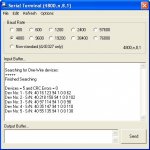
    Attached is the first release my working code for searching a one-wire network and reporting back.

    Working for any combination form zero (0) to 5 devices that I currently have available but should work to the max number possible with the 64 bit serial number encoding.

    Feel free to test and see if it can be broken.

    Might shortly put some words together on the topic based upon what I have learnt here for One-Wire devices and post the lot in the completed projects area.

    Have fun
    Attached Images Attached Images
    Attached Files Attached Files
    Last edited by westaust55; 15-05-2010 at 06:17.
    westaust55

    Hey Hamlet, 2B OR NOT 2B = $FF

  9. #9
    Senior Member
    Join Date
    Jan 1970
    Location
    Colorado USA
    Posts
    1,961

    Default AN148 long leads

    For some practical hardware info on long wire 1 wire networks it's worth a look at maxim-ic.com AN148 app note... looks like you've got the math going OK

  10. #10
    Moderator
    Join Date
    Mar 2008
    Location
    Western Australia
    Posts
    9,943

    Lightbulb More Information on 1-Wire networks

    Although some way to go to wrap up this document, it does provide a starting point for new comers to 1-Wire to understand a bit about how it works.

    In conjunction with the code posted recently for searching a 1-Wire network this provides a start.

    I will be aiming to add more information and some example code for various 1-Wire chips at a future date. Currently awaiting more chips arriving to play with other than a group of 18B20’s.

    have fun


    EDIT: See post 43 (page5) for an update to the attached words as rev E
    Attached Files Attached Files
    Last edited by westaust55; 16-06-2010 at 01:09. Reason: added Reference to tutoria Rev E
    westaust55

    Hey Hamlet, 2B OR NOT 2B = $FF

Bookmarks

Posting Permissions

  • You may not post new threads
  • You may not post replies
  • You may not post attachments
  • You may not edit your posts
  •